This year’s State of the Word delivered something rare: a snapshot of a project accelerating on every front at once. WordPress 6.9 launched live during the keynote, new AI infrastructure landed across core and the plugin ecosystem, and global community programs revealed just how many new builders are joining the movement. The message running underneath it all was simple: the future of WordPress is both deeply human and unmistakably intelligent.
A Keynote Framed by People, Not Just Code
Executive Director Mary Baum opened with something that set the tone for the whole event: “WordPress doesn’t run on servers. It runs on people who show up.” She talked about a year spent listening and travelling, meeting:
- People using WordPress to change careers
- Contributors who started with a single translation or support reply and now lead major parts of the project
- Students getting access to WordPress tools and building faster than anyone expected
And then she dropped the headline: for the first time ever, WordPress would ship a major version live during State of the Word. That release was WordPress 6.9 “Gene,” described as fast, polished, and built for collaboration.
The State of WordPress in 2025: Holding Steady at Massive Scale
Matt Mullenweg picked things up by zooming all the way out.
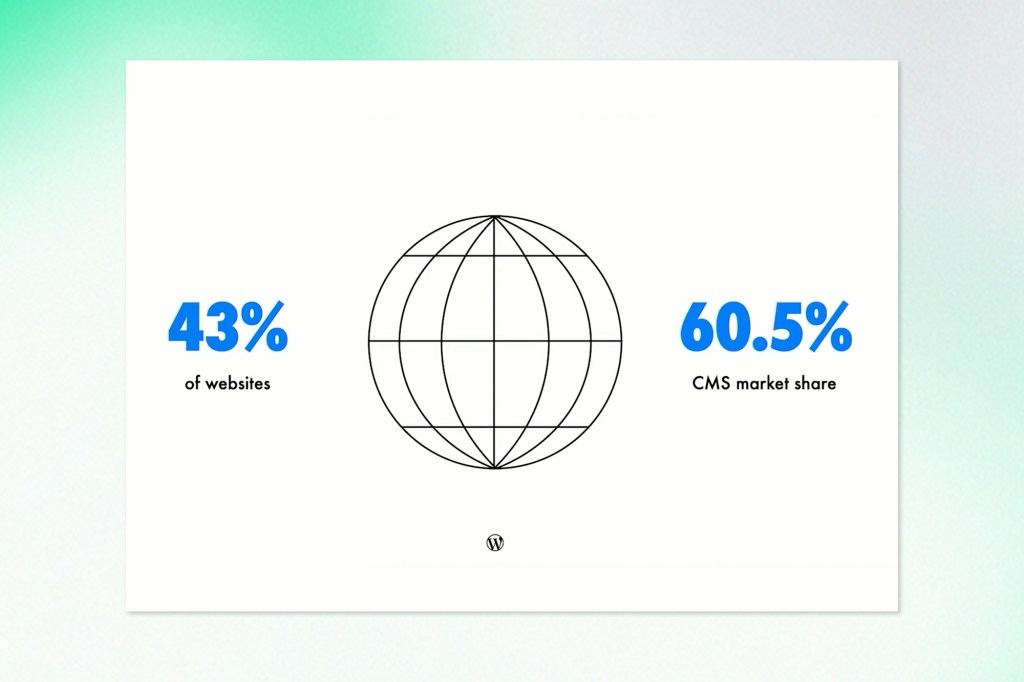
- WordPress is holding at around 43% of the web and about 60% of the CMS market, which matters because keeping that steady at this scale is its own challenge.
- In Japan, WordPress now powers 58.5% of all websites and 83% of CMS-powered sites, a sign of how strong some local ecosystems have become.
- For the first time, more than 56% of WordPress sites are non-English, with Japanese now the most popular language after English.
WordPress is increasingly global, multilingual, and present in every tier of the web. And one of the most striking stats: WordPress now powers 49.4% of the top 1,000 sites in the world, up a couple of percentage points from last year. That range remains one of WordPress’s superpowers.
WordPress 6.9 “Gene”: Collaboration With Soul
6.9 was the star of the show. Named “Gene” in honour of jazz pianist Gene Harris, the release is framed as “collaboration with soul”, shipping a mix of editor polish, team features, and new developer foundations.
Key highlights:
Block-level Notes: Inline Collaboration Inside the Editor
The biggest visible feature is Notes:
- You can now leave comments directly on individual blocks in the editor
- When a note is selected, the rest of the content subtly fades so the feedback target is crystal clear
- Notes are stored as regular WordPress comments, so they hook into existing email notifications and workflows
This is the first big step toward a truly multiplayer editor experience: reviews, approvals, and revisions happening right on the canvas rather than in back-and-forth email threads or external tools.
Command Palette Everywhere
The Command Palette, which started in the site editor, is now available across the entire dashboard:
- Jump between admin screens
- Trigger actions
- Navigate templates, posts, and settings with a few keystrokes
In the future, Commands will be powered by the new Abilities API, so anything registered as an ability can be surfaced and executed through this palette.
New Design Tools: Stretchy Text, Drag-and-Drop, and an Accordion Block
On the design side, 6.9 focused on making things feel more direct and tactile:
- Stretchy Text: a new typography option that automatically adjusts font size so headings or paragraphs perfectly fill their container. Great for hero banners, callouts, and prominent sections.
- Smoother drag-and-drop: you can drag list items, gallery images, and other blocks directly, without hunting for tiny drag handles.
- Gallery aspect ratios: galleries now support aspect ratio settings, so mixed-sized images can be lined up neatly.
- A long-requested Accordion block, built on the Interactivity API, with full control over icons, open/closed state, and nested blocks inside.
Smarter Site Building and Block Visibility
Several changes target people building complex sites and patterns:
- The Command Palette in admin reduces click-heavy navigation across large sites.
- Container blocks now expose “allowed blocks” controls in the UI, not just in code, so theme authors can create structured layouts without writing custom block types.
- The Navigation block got usability fixes, including clearer “Edit Navigation” entry points and more styling options for submenus.
- Blocks can now be hidden on the front-end while remaining editable in the backend. That sets the stage for future conditional visibility, like showing or hiding blocks based on device, login state, or other rules.
Block Bindings and Data-Connected Blocks
The Block Bindings UI has been refreshed so creators can:
- Switch between data sources more easily
- Bind/unbind attributes with a single click
- Take advantage of custom data sources registered by plugins
This continues the move toward data-aware blocks that can pull from custom tables, APIs, or external systems by default.
Abilities API: The AI-ready “Capabilities” Layer
Under the hood, 6.9 introduces the Abilities API, a unified registry for things WordPress can do:
- Each “ability” describes an action (what it does, what inputs it needs, and what output you can expect)
- Abilities can be called from PHP, REST endpoints, the Command Palette, CLI tools, or AI agents
- They provide a standard way for plugins and core to expose functionality to humans and to AI systems alike
Think of it as a next-generation, machine-readable cousin of hooks and filters, designed for a future where agents and workflows need a clear, structured way to “drive” WordPress.
Safer Updates and Better Imports
Two quality-of-life changes aimed squarely at stability:
- A new 24-hour safety window before plugin updates roll out to sites with auto-updates enabled. Early adopters can install immediately; everyone else benefits from a buffer where serious issues can be caught and fixed.
- The WordPress importer now includes an option to rewrite URLs automatically, so imported content can point to the new domain without manual search-and-replace work. WordPress.org
Both are about shipping fast without sacrificing trust at scale.
AI, Agents, and Telex: WordPress as an Automation Platform
No surprise: AI occupied a huge chunk of the keynote. Matt revisited his 2022 call for the community to “learn AI deeply,” then pointed at how far things have moved since the launch of ChatGPT. Image generation, real-time translation, and code assistants are now baseline tools rather than curiosities.
The AI story in WordPress falls into a few layers:
The Core AI Building Blocks
The newly formed WordPress AI team outlined four foundational pieces that all landed around the 6.9 timeframe:
- Abilities API: a unified, machine-readable registry of what WordPress can do.
- WordPress AI Client (WP AI Client): a PHP abstraction that can talk to different AI models (OpenAI, Google, Anthropic, local models in browsers, etc.) through one consistent interface.
- MCP adapter: an implementation of Anthropic’s Model Context Protocol that lets tools like Claude or Copilot interact with WordPress Abilities in a standard way.
- AI Experiments plugin: a playground of AI-powered features for editors and developers, built using these blocks and now available in the plugin directory.
Together, these let developers write “prompt + ability” style integrations without hard-coding a single AI provider.
AI as Co-developer and Co-admin
Matt showed several ways AI can now “touch” WordPress:
- MCP-driven agents that read site stats (via Jetpack), list top posts, or suggest content ideas
- AI-powered IDEs and CLIs that can refactor plugins, search codebases, and run WP-CLI tasks
- Browser agents that can literally click through wp-admin, creating posts or changing settings like a human, but scriptable
The plan for 2026 includes benchmarks and evals so model makers can test how well their models perform on WordPress-specific tasks (editing, plugin adjustments, UI actions, and more).
Telex and AI-generated Blocks
One of the showiest demos was Telex, a tool that generates Gutenberg blocks from natural language:
- A full pricing comparison component
- A header block that pulls real-time data from Google Places
- A uniform post grid, a calendar pulling from Google Calendar
All of it was created without hand-coding, inside a browser, using Telex as the “block engine.”
Designer Tammy Lister went even further in her “Blocktober” project, building a new Telex-powered block every day in October, including:
- A playable ASCII Tetris block
- A terminal-style block
- A trick-or-treat Halloween block
This is where “democratizing publishing” starts to bleed into “democratizing front-end development.”
AI for Safety, Review, and Scale
AI is not just about content creation. It is already reshaping operations:
- Plugin reviews have jumped from a significant backlog to sub-week turnaround times
- Every plugin update can now be scanned and checked automatically, not just new submissions
- The long-term goal is to use AI to raise the baseline security and code quality of the entire ecosystem, especially smaller plugins that do not have large review teams
This is where the sheer size of WordPress (tens of thousands of plugins, millions of sites) turns from a liability into an opportunity for systemic improvements.
Education, WordCamps, and the Next Generation
After the technical deep-dives, Mary brought things back to people and education.
A Huge Year for WordCamps
This year saw:
- 81 WordCamps in 39 countries, organized by more than 5,200 volunteers and reaching over 100,000 people in person
- 16 more events coming before year-end, putting 2025 on track for 97 WordCamps total
These are not just conferences. They’re where contributors meet, where local communities form, and where new people find their way into the project.
Learn WordPress and a better funnel into contribution
Education is happening online as well:
- Learn.WordPress.org served more than 1.5 million users this year
- After WordCamp US, average engagement time per user went up by 32%, suggesting people are sticking around and actually learning
- WordPress.org itself reached 113+ million users, with new users up 38% year-over-year
The opportunity now is to connect that discovery phase (reading docs, comparing platforms) with structured paths into learning and contribution: Learn.WordPress.org, the WordPress Credits program, and Campus Connect.
Campus Connect and the Fidelitas Model
One standout case study: Universidad Fidélitas in Costa Rica.
- The university hosted WordPress Campus Connect San José, bringing together students, faculty, and international contributors.
- They then launched the WordPress Fidélitas Club, a student-led group creating a pipeline into open source contribution.
- WordPress is now formally embedded in the Computer Systems Engineering degree, with students earning official WordPress credits for contributions in code, design, docs, accessibility, and more.
The takeaway: universities can act as trusted gateways into open source ecosystems, treating contribution as hands-on applied learning rather than a side activity.
Playground, Studio, and Development Workflows
The tooling story continued with WordPress Playground, the in-browser WordPress environment that runs entirely client-side.
Since the last State of the Word:
- Playground has been used 1.4 million times across 227 countries
- It now has a file browser, so you can edit and test theme and plugin files directly in your browser
- A gallery of blueprints lets people spin up purpose-built WordPress instances from a single link
- The new Playground CLI reached stability, with features like Xdebug support and options tailored to AI-assisted development
- Playground supports more than 99% of plugins, plus tools like phpMyAdmin, Composer, and even Laravel, by emulating a WordPress-friendly stack inside WebAssembly
On top of that, WordPress Studio, the local development app built on Playground, now uses blueprints as a starting point, so reproducible environments are only a click away.
Roadmap: WordPress 7.0, workflows, and AI as a collaborator
The AI panel also sketched out what’s coming next.
Short-term: 7.0 and Phase 3
For WordPress 7.0 and the rest of Phase 3, the AI team highlighted:
- The client-side half of the Abilities API, so abilities can be discovered and triggered from the browser as well as the server.
- A sibling concept called Workflows: chains of abilities that can be triggered by events (an order in WooCommerce, a comment, a cron, etc.) or by user commands.
- WP AI Client in core, so every plugin can talk to AI via one standard interface, and hosts can ship AI credits or providers that all plugins can tap into.
This is also where collaborative editing and AI intersect. The same infrastructure that allows multiple humans to work on a document at once can also allow AI to appear as a “partner” in the editor, suggesting changes, generating excerpts, or flagging accessibility issues as you type.
Longer Term: WordPress As the Centre of the Open Web in an AI Era
Looking further out, the team sees WordPress remaining:
- The canonical home for content on the open web
- A platform that AI tools rely on, rather than compete with, because they need high-quality, human-created content in order to be useful.
The strategy is to:
- Keep content and data portable and liberated (ongoing focus on imports, exports, and interoperable APIs)
- Make AI a layer on top of WordPress rather than a separate silo
- Preserve the open source ethos with things like support for open models, browser-local models, and provider-agnostic tooling
Or as James from the AI team put it, this is about “democratizing access to AI” in a way that mirrors how WordPress democratized publishing.
WordPress Charts a Confident Path Forward
State of the Word 2025 closed on a message that resonated throughout the keynote: WordPress is growing not just in size, but in purpose. The release of 6.9, the expansion of AI tooling, and the rise of global education initiatives all point to a platform redefining what open-source publishing can be. It’s a project investing in long-term clarity, stronger architecture, clearer pathways for new contributors, and tools that meet the needs of modern creators and enterprises alike. As WordPress moves toward 7.0, the vision feels more aligned than ever: build openly, evolve responsibly, and continue shaping a web that belongs to everyone.